【 使用环境 】生产环境 or 测试环境
【 OB or 其他组件 】
flinkcdc版本2.4.2
【 使用版本 】
#OB版本
[root@4e94d3b3da17 ~]# obclient -h192.168.1.47 -P2881 -uroot@sys -pocean@123
Welcome to the OceanBase. Commands end with ; or \g.
Your OceanBase connection id is 3221503998
Server version: OceanBase_CE 4.3.5.5 (r105000012025111711-c10174c0486c38f64a2222486986bbe15d5da0dc) (Built Nov 17 2025 12:20:08)
#logproxy 版本
[root@data-source oblogproxy]# ./bin/logproxy --version
version: 4.3.5-836e752c3cfc137ae8606584d667681fc8fa50db
【问题描述】清晰明确描述问题
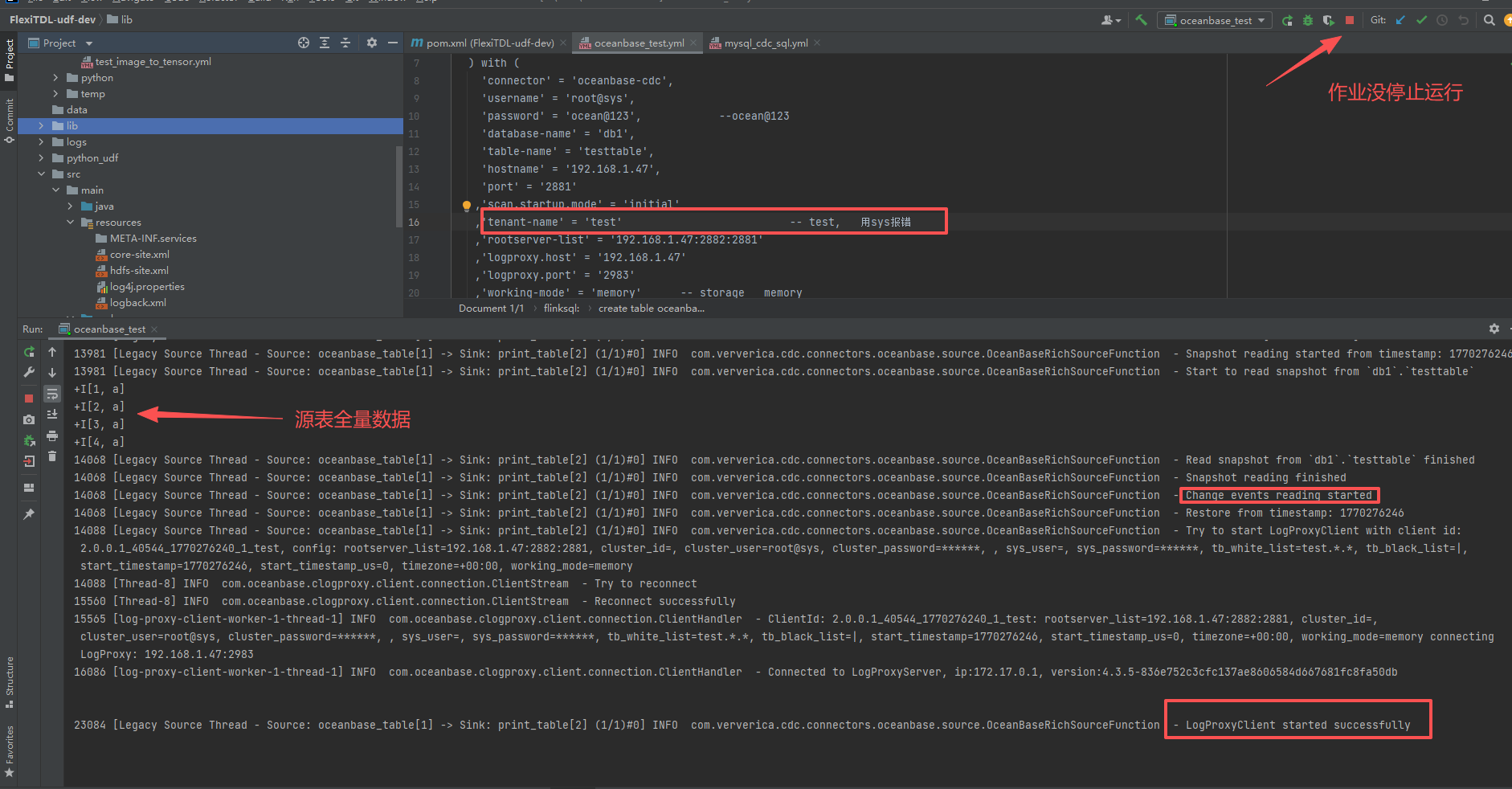
flinkcdc读取ob数据,能读取到全量数据, 但是ob表新增的数据(比如c1=10的增量数据)不能读取到;
【复现路径】问题出现前后相关操作
【附件及日志】推荐使用OceanBase敏捷诊断工具obdiag收集诊断信息,详情参见链接(右键跳转查看):
【SOP系列 22 】——故障诊断第一步(自助诊断和诊断信息收集)
#cdc作业数据源虚拟表
create table oceanbase_table(
c1 int,
c2 string,
PRIMARY KEY(c1) NOT ENFORCED
) with (
‘connector’ = ‘oceanbase-cdc’,
‘username’ = ‘root@sys’,
‘password’ = ‘ocean@123’,
‘database-name’ = ‘db1’,
‘table-name’ = ‘testtable’,
‘hostname’ = ‘192.168.1.47’,
‘port’ = ‘2881’,
‘scan.startup.mode’ = ‘initial’,
‘tenant-name’ = ‘test’, – ai说不要用sys
‘rootserver-list’ = ‘192.168.1.47:2882:2881’,
‘logproxy.host’ = ‘192.168.1.47’,
‘logproxy.port’ = ‘2983’,
‘working-mode’ = ‘memory’ – storage memory
);
#cdc作业打印输出信息
13577 [Legacy Source Thread - Source: oceanbase_table[1] → Sink: print_table[2] (1/1)#0] INFO com.ververica.cdc.connectors.oceanbase.source.OceanBaseRichSourceFunction - Start to initial table whitelist
Loading class com.mysql.jdbc.Driver'. This is deprecated. The new driver class is com.mysql.cj.jdbc.Driver’. The driver is automatically registered via the SPI and manual loading of the driver class is generally unnecessary.
14144 [Legacy Source Thread - Source: oceanbase_table[1] → Sink: print_table[2] (1/1)#0] INFO com.ververica.cdc.connectors.oceanbase.source.OceanBaseRichSourceFunction - Pattern matched tables: [db1.testtable]
14144 [Legacy Source Thread - Source: oceanbase_table[1] → Sink: print_table[2] (1/1)#0] INFO com.ververica.cdc.connectors.oceanbase.source.OceanBaseRichSourceFunction - Table list: [db1.testtable]
14144 [Legacy Source Thread - Source: oceanbase_table[1] → Sink: print_table[2] (1/1)#0] INFO com.ververica.cdc.connectors.oceanbase.source.OceanBaseRichSourceFunction - Start readChangeRecords process
14164 [Legacy Source Thread - Source: oceanbase_table[1] → Sink: print_table[2] (1/1)#0] INFO com.ververica.cdc.connectors.oceanbase.source.OceanBaseRichSourceFunction - LogProxyClient started
14164 [Thread-8] INFO com.oceanbase.clogproxy.client.connection.ClientStream - Try to reconnect
15606 [Thread-8] INFO com.oceanbase.clogproxy.client.connection.ClientStream - Reconnect successfully
15635 [log-proxy-client-worker-1-thread-1] INFO com.oceanbase.clogproxy.client.connection.ClientHandler - ClientId: 2.0.0.1_17488_1770035315_1_test: rootserver_list=192.168.1.47:2882:2881, cluster_id=, cluster_user=root@sys, cluster_password=, , sys_user=, sys_password=, tb_white_list=test.., tb_black_list=|, start_timestamp=0, start_timestamp_us=0, timezone=+00:00, working_mode=memory connecting LogProxy: 192.168.1.47:2983
16321 [log-proxy-client-worker-1-thread-1] INFO com.oceanbase.clogproxy.client.connection.ClientHandler - Connected to LogProxyServer, ip:172.17.0.1, version:4.3.5-836e752c3cfc137ae8606584d667681fc8fa50db
23769 [Legacy Source Thread - Source: oceanbase_table[1] → Sink: print_table[2] (1/1)#0] INFO com.ververica.cdc.connectors.oceanbase.source.OceanBaseRichSourceFunction - LogProxyClient packet processing started from timestamp 1770035324
23769 [Legacy Source Thread - Source: oceanbase_table[1] → Sink: print_table[2] (1/1)#0] INFO com.ververica.cdc.connectors.oceanbase.source.OceanBaseRichSourceFunction - Snapshot reading started
23769 [Legacy Source Thread - Source: oceanbase_table[1] → Sink: print_table[2] (1/1)#0] INFO com.ververica.cdc.connectors.oceanbase.source.OceanBaseRichSourceFunction - Start to read snapshot from db1.testtable
+I[1, b]
+I[2, a]
+I[3, a]
+I[4, a]
+I[5, a]
+I[6, a]
+I[7, a]
+I[8, a]
+I[9, a]
23822 [Legacy Source Thread - Source: oceanbase_table[1] → Sink: print_table[2] (1/1)#0] INFO com.ververica.cdc.connectors.oceanbase.source.OceanBaseRichSourceFunction - Read snapshot from db1.testtable finished
23822 [Legacy Source Thread - Source: oceanbase_table[1] → Sink: print_table[2] (1/1)#0] INFO com.ververica.cdc.connectors.oceanbase.source.OceanBaseRichSourceFunction - Snapshot reading finished
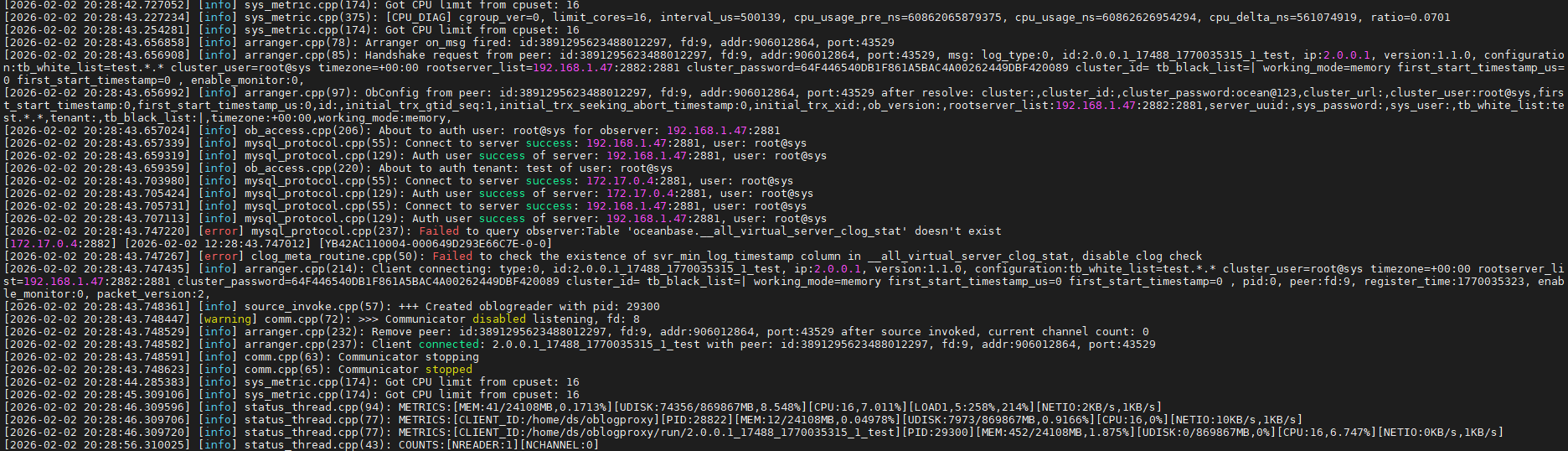
#logproxy.log部分显示有异常的日志如下:
#conf.json配置部分如下,只修改了ob_sys_username和ob_sys_password
{
“service_port”: 2983,
“encode_threadpool_size”: 8,
“encode_queue_size”: 20000,
“max_packet_bytes”: 67108864,
“record_queue_size”: 20000,
“read_timeout_us”: 2000000,
“read_fail_interval_us”: 1000000,
“read_wait_num”: 20000,
“send_timeout_us”: 2000000,
“send_fail_interval_us”: 1000000,
“check_quota_enable”: false,
“check_clog_enable”: true,
“command_timeout_s”: 10,
“log_quota_size_mb”: 5120,
“log_quota_day”: 7,
“log_gc_interval_s”: 43200,
“log_level”: 2,
“loh_flush_strategy”: 1,
“log_flush_level”: 2,
“log_flush_period_s”: 1,
“log_max_file_size_mb”: 1024,
“log_retention_h”: 360,
“oblogreader_path_retain_hour”: 168,
“oblogreader_lease_s”: 300,
“oblogreader_path”: “./run”,
“bin_path”: “./bin”,
“oblogreader_timezone_conf”: “…/…/conf/timezone_info.conf”,
“oblogreader_obcdc_path_template”: “…/…/obcdc/obcdc-%s.x-access/libobcdcaccess.so”,
“oblogreader_obcdc_ce_path_template”: “…/…/obcdc/obcdc-ce-%s.x-access/libobcdcaccess.so”,
“allow_all_tenant”: true,
“auth_user”: true,
“auth_use_rs”: false,
“auth_allow_sys_user”: true,
“ob_sys_username”: “57C7BF6DCA3A9F207697EB7CA7DED408”,
“ob_sys_password”: “F60F11392814924E0E492835B1FF9427”,
“counter_interval_s”: 2,
“metric_enable”: true,
“metric_interval_s”: 10,
“prometheus_port”: 2984,
“debug”: false,
“verbose”: false,
“verbose_packet”: false,
“verbose_record_read”: false,
“readonly”: false,
“count_record”: false,
“channel_type”: “plain”,
“tls_ca_cert_file”: “”,
“tls_cert_file”: “”,
“tls_key_file”: “”,
“tls_verify_peer”: true,
“liboblog_tls”: false,
“liboblog_tls_cert_path”: “”,
“binlog_log_bin_basename”: “./run”,
【备注】基于 LLM 和开源文档 RAG 的论坛小助手已开放测试,在发帖时输入 [@论坛小助手] 即可召唤小助手,欢迎试用!