

【使用环境 】 命令行部署 OceanBase 数据库生产环境
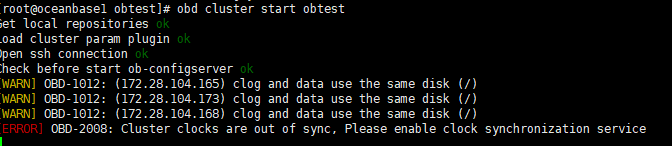
【问题描述】obd start 数据库集群时报错:[ERROR] OBD-2008: Cluster clocks are out of sync, Please enable clock synchronization service;
我时钟源确实配置同步了,也校验过三台服务器的时间差在几毫秒内,为啥仍然报这个错?
2 个赞
看上去像是没有在systemctl 中把时间同步设置为启动项
4 个赞
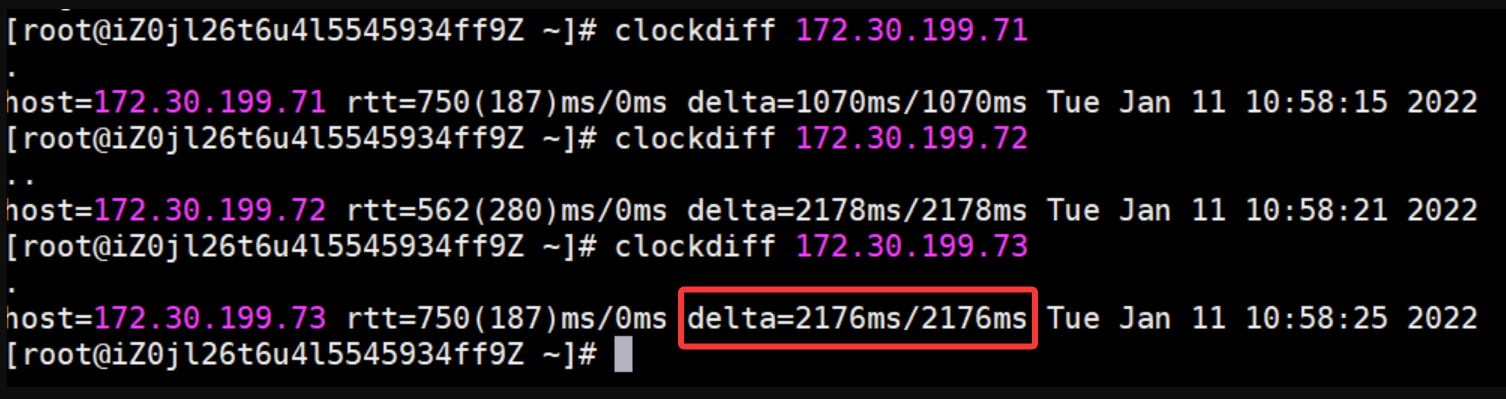
执行下
clockdiff 172.28.104.165
clockdiff 172.28.104.173
clockdiff 172.28.104.168
4 个赞
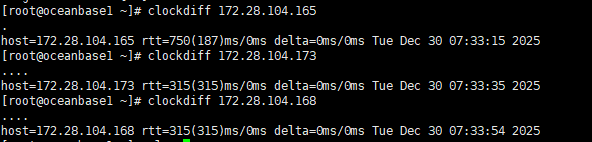
大佬,165机器是ob节点也是作为ntp服务端
5 个赞
5 个赞
这个时差还是有点大的。obd内部判断是小于500ms
换个时钟源或者
修改obd的文件
vim /usr/obd/plugins/oceanbase-ce/x.x.x.x/start_check.py和
vim ~/.obd/plugins/oceanbase-ce/x.x.x.x/start_check.py
中的 if times and max(times) - min(times) > 500 修改为 1500 (注意这里的阈值示例 1500 单位是毫秒,需要满足小于2秒 且 大于当前的时钟偏差的值)。
4 个赞
你使用的ntp同步还是 chrony ? 可以参考这个案例试试, 使用obd命令起动ob集群报错:[ERROR] Cluster NTP is out of sync - 社区问答- OceanBase社区-分布式数据库
4 个赞
好的,谢谢大佬
5 个赞
学习,需要配置时钟源 chrony或者NTP
5 个赞
目录没有start_check.py文件,只有start_check_pre.py,且文件内容没有关于时间的配置
5 个赞
obd版本是多少 推荐更新到最新版
5 个赞
期待答案
3 个赞
cron同步时间呢
3 个赞
学习
1 个赞
我这几天也遇到了这个问题。启动集群报错,600ms估计也超了。但是没找调大时间差的文件。
[root@obd01 4.0.0.0]# clockdiff 192.168.56.150
…
host=192.168.56.150 rtt=562(280)ms/0ms delta=-600ms/-600ms Fri Jan 9 10:27:43 2026
目录也没发现start_check.py文件,只有start_check_pre.py,且文件内容没有关于时间的配置
obd cluster start ocp_1 报错日志:
[2026-01-09 09:24:04.276] [DEBUG] – 192.168.56.150 time delta -581.622802734375
[2026-01-09 09:24:04.277] [ERROR] [ERROR] oceanbase-ce-py_script_resource_check-4.0.0.0 RuntimeError: cannot access local variable ‘server’ where it is not associated with a value
[2026-01-09 09:24:04.277] [ERROR] Traceback (most recent call last):
[2026-01-09 09:24:04.277] [ERROR] File “core.py”, line 2376, in start_cluster
[2026-01-09 09:24:04.277] [ERROR] File “core.py”, line 2429, in _start_cluster
[2026-01-09 09:24:04.277] [ERROR] File “core.py”, line 263, in run_workflow
[2026-01-09 09:24:04.277] [ERROR] File “core.py”, line 305, in run_plugin_template
[2026-01-09 09:24:04.277] [ERROR] File “core.py”, line 354, in call_plugin
[2026-01-09 09:24:04.277] [ERROR] File “_plugin.py”, line 348, in call
[2026-01-09 09:24:04.277] [ERROR] File “_plugin.py”, line 304, in _new_func
[2026-01-09 09:24:04.277] [ERROR] File “/home/admin/.obd/plugins/oceanbase-ce/4.0.0.0/resource_check.py”, line 252, in resource_check
[2026-01-09 09:24:04.277] [ERROR] critical(server, ‘ntp’, err.EC_OBSERVER_TIME_OUT_OF_SYNC.format(), [err.SUG_OBSERVER_TIME_OUT_OF_SYNC.format()])
[2026-01-09 09:24:04.277] [ERROR] ^^^^^^
[2026-01-09 09:24:04.277] [ERROR] UnboundLocalError: cannot access local variable ‘server’ where it is not associated with a value
[2026-01-09 09:24:04.277] [ERROR]
[2026-01-09 09:24:04.277] [DEBUG] - sub resource_check ref count to 0
[2026-01-09 09:24:04.277] [DEBUG] - export resource_check
[2026-01-09 09:24:04.277] [DEBUG] - plugin oceanbase-ce-py_script_resource_check-4.0.0.0 result: False
[2026-01-09 09:24:04.281] [INFO] Trace ID: e1e83c5c-ecf9-11f0-ac5b-000c29a1a8c4
[2026-01-09 09:24:04.281] [INFO] If you want to view detailed obd logs, please run: obd display-trace e1e83c5c-ecf9-11f0-ac5b-000c29a1a8c4
谁知道具体怎么解决?
[admin@obd01 ~]$ obd --version
OceanBase Deploy: 4.0.0
REVISION: 44b780d08efba6de1ce19e6d4a67631eba4cff24
BUILD_BRANCH: HEAD
BUILD_TIME: Nov 17 2025 14:36:56OURCE
Copyright (C) 2025 OceanBase
License Apache 2.0: Apache version 2 or later https://www.apache.org/licenses/LICENSE-2.0.
This is free software: you are free to change and redistribute it.
There is NO WARRANTY, to the extent permitted by law.
[admin@obd01 ~]$
把 ntp 重启下,确保 ntp 服务能正常同步时间,追平延迟就可以了