

【 使用环境 】 测试环境
【 OB or OBA 】
【 使用版本 】 V4.4.2
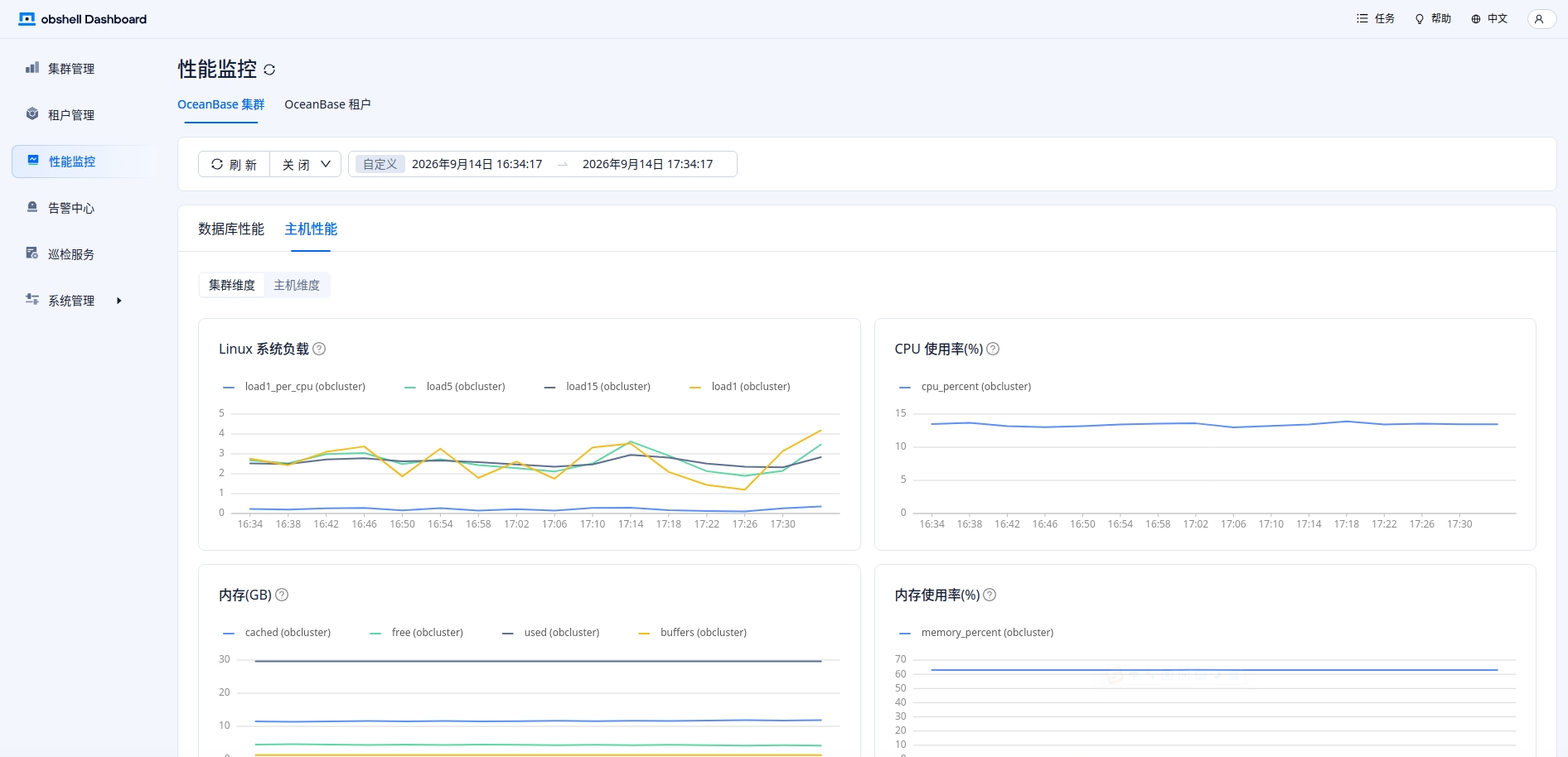
【问题描述】 请问我根据文档部署了OBV4.4.2 https://www.oceanbase.com/docs/common-oceanbase-database-cn-1000000005282718 , 在obshell Dashboard的性能监控里只看到了主机性能,没有数据库性能的指标
1 个赞
具体的截图信息

能用谷歌浏览器 打开开发者模式 看看访问的api接口 截图发一下 在把日志发一下 应该是Prometheus 里没有 ob_sysstat 这类库内指标导致的。
– 主机指标,你这边预期有数据
curl -u ‘用户:密码’ ‘http://<obagent_ip>:8088/metrics/node/host’ | head
– 库指标,重点看有没有 ob_sysstat
curl -u ‘用户:密码’ ‘http://<obagent_ip>:8088/metrics/ob/basic’ | grep ob_sysstat | head
进程信息查看
ps -ef | grep -E ‘obagent|monagent’ | grep -v grep

[root@7046a12b8070 ~]# ps -ef | grep -E ‘obagent|monagent’ | grep -v grep
root 16501 1 0 Sep11 ? 00:01:34 /home/admin/obagent/bin/ob_agentd -c /home/admin/obagent/conf/agentd.yaml
root 16507 16501 0 Sep11 ? 00:00:04 /home/admin/obagent/bin/ob_mgragent
root 16508 16501 0 Sep11 ? 00:02:51 /home/admin/obagent/bin/ob_monagent
obshell日志:/log_obshell/obshell.log observer日志:observer.log monagent的日志:/home/admin/obagent/log/ 或安装目录下 log/ prometheus日志:部署目录里的 prometheus 日志 这几个日志 提供一下
在查一下这个几个信息
curl -u ‘admin:密码’ ‘http://obstandalone:8088/metrics/ob/basic’ | head
curl -u ‘admin:密码’ ‘http://obstandalone:8088/metrics/ob/extra’ | head
curl -u ‘admin:密码’ ‘http://obstandalone:8088/metrics/stat’ | head
– 1. pipeline 开没开
grep -R “pipeline.ob.status|ob_monitor_status|monagent.pipeline.ob”
/home/admin/obagent/conf/ 2>/dev/null
– 2. 看 monitor_ob.yaml 末尾 status 被替换成了什么
grep -n -A5 “module: monitor.ob” /home/admin/obagent/conf/module_config/monitor_ob.yaml
– 3. monagent 日志(采集连不上库也会在这里)
ls /home/admin/obagent/log/
grep -E “monitor.ob|ob_basic|pipeline|sql|error|fail” /home/admin/obagent/log/monagent.log | tail -50
临时给你调整了等级 可以继续回复了
[root@7046a12b8070 ~]# curl -u admin:password http://obstandalone:8088/metrics/ob/extra | head
% Total % Received % Xferd Average Speed Time Time Time Current
Dload Upload Total Spent Left Speed
100 18 100 18 0 0 9000 0 --:–:-- --:–:-- --:–:-- 18000
404 page not found[root@7046a12b8070 ~]# curl -u admin:password http://obstandalone:8088/metrics/stat | head
% Total % Received % Xferd Average Speed Time Time Time Current
Dload Upload Total Spent Left Speed
0 0 0 0 0 0 0 0 --:–:-- --:–:-- --:–:-- 0# HELP go_gc_cycles_automatic_gc_cycles_total Count of completed GC cycles generated by the Go runtime.
TYPE go_gc_cycles_automatic_gc_cycles_total counter
go_gc_cycles_automatic_gc_cycles_total{app=“HOST”,process=“ob_monagent”,svr_ip=“172.19.0.2”} 7853
HELP go_gc_cycles_forced_gc_cycles_total Count of completed GC cycles forced by the application.
TYPE go_gc_cycles_forced_gc_cycles_total counter
go_gc_cycles_forced_gc_cycles_total{app=“HOST”,process=“ob_monagent”,svr_ip=“172.19.0.2”} 0
HELP go_gc_cycles_total_gc_cycles_total Count of all completed GC cycles.
TYPE go_gc_cycles_total_gc_cycles_total counter
go_gc_cycles_total_gc_cycles_total{app=“HOST”,process=“ob_monagent”,svr_ip=“172.19.0.2”} 7853
HELP go_gc_duration_seconds A summary of the pause duration of garbage collection cycles.
100 20272 0 20272 0 0 6598k 0 --:–:-- --:–:-- --:–:-- 6598k
curl: (23) Failed writing body (0 != 2048)
[root@7046a12b8070 ~]# grep -R “pipeline.ob.status|ob_monitor_status|monagent.pipeline.ob”
bash: ob_monitor_status: command not found
bash: $‘monagent.pipeline.ob\342\200\235’: command not found
grep -n -A5 “module: monitor.ob” /home/admin/obagent/conf/module_config/monitor_ob.yaml
^C
[root@7046a12b8070 ~]# grep -R “pipeline.ob.status|ob_monitor_status|monagent.pipeline.ob”
bash: ob_monitor_status: command not found
bash: $‘monagent.pipeline.ob\342\200\235’: command not found
^C
[root@7046a12b8070 ~]# grep -R “pipeline.ob.status|ob_monitor_status|monagent.pipeline.ob” /home/admin/obagent/conf/ 2>/dev/null
bash: ob_monitor_status: command not found
^C
[root@7046a12b8070 ~]# cat /home/admin/obagent/conf/
.config_secret.key agentctl.yaml config_properties/ module_config/ obd_agent_mapper.yaml shell_templates/
2026-09-11T10:56:37.4649Z/ agentd.yaml mgragent.yaml monagent.yaml prometheus_config/
[root@7046a12b8070 ~]# cat /home/admin/obagent/conf/^C
[root@7046a12b8070 ~]# grep -n -A5 “module: monitor.ob” /home/admin/obagent/conf/module_config/monitor_ob.yaml
grep: monitor.ob”: No such file or directory
[root@7046a12b8070 ~]#
[root@7046a12b8070 ~]# grep -n -A5 “module: monitor.ob” /home/admin/obagent/conf/module_config/
common_module.yaml mgragent_module.yaml monitor_mysql.yaml monitor_ob_custom.yaml ob_logcleaner_module.yaml
log_module.yaml monagent_basic_auth.yaml monitor_node_host.yaml monitor_ob_log.yaml
mgragent_logquerier_module.yaml monitor_host_log.yaml monitor_ob.yaml monitor_observer_log.yaml
[root@7046a12b8070 ~]# grep -n -A5 “module: monitor.ob” /home/admin/obagent/conf/module_config/monitor_ob.yaml
grep: monitor.ob”: No such file or directory
[root@7046a12b8070 ~]# grep -n -A5 “module: monitor.ob” /home/admin/obagent/conf/module_config/monitor_ob.yaml |^C
[root@7046a12b8070 ~]# cat /home/admin/obagent/conf/module_config/monitor_ob.yaml | grep -n -A5 “module: monitor.ob”
grep: monitor.ob”: No such file or directory
[root@7046a12b8070 ~]# cat /home/admin/obagent/conf/module_config/monitor_ob.yaml | grep -n -A5 “module: monitor.ob”^C
[root@7046a12b8070 ~]# cat moni^C
[root@7046a12b8070 ~]# ^C
[root@7046a12b8070 ~]# ls /home/admin/obagent/log/
agentctl.log agentd.err.log agentd.log agentd.out.log mgragent.log monagent.log ob_mgragent.error.log ob_mgragent.output.log ob_monagent.error.log ob_monagent.output.log
[root@7046a12b8070 ~]# ls /home/admin/obagent/log/
agentctl.log agentd.err.log agentd.log agentd.out.log mgragent.log monagent.log ob_mgragent.error.log ob_mgragent.output.log ob_monagent.error.log ob_monagent.output.log
[root@7046a12b8070 ~]# grep -E “monitor.ob|ob_basic|pipeline|sql|error|fail” /home/admin/obagent/log/monagent.log | tail -50
bash: ob_basic: command not found
bash: pipeline: command not found
bash: sql: command not found
bash: error: command not found
bash: $‘fail\342\200\235’: command not found
把日志信息 也要提供一下
已提供
日志文件 你发哪了 没有看到呀 命令查看的你是直接粘贴过去 注意字符转译 要不然会有问题 让你查看的信息 你也没有查完