

【 使用环境 】生产环境
【 OB or 其他组件 】
【 使用版本 】oceanbase 社区版V4.5.0
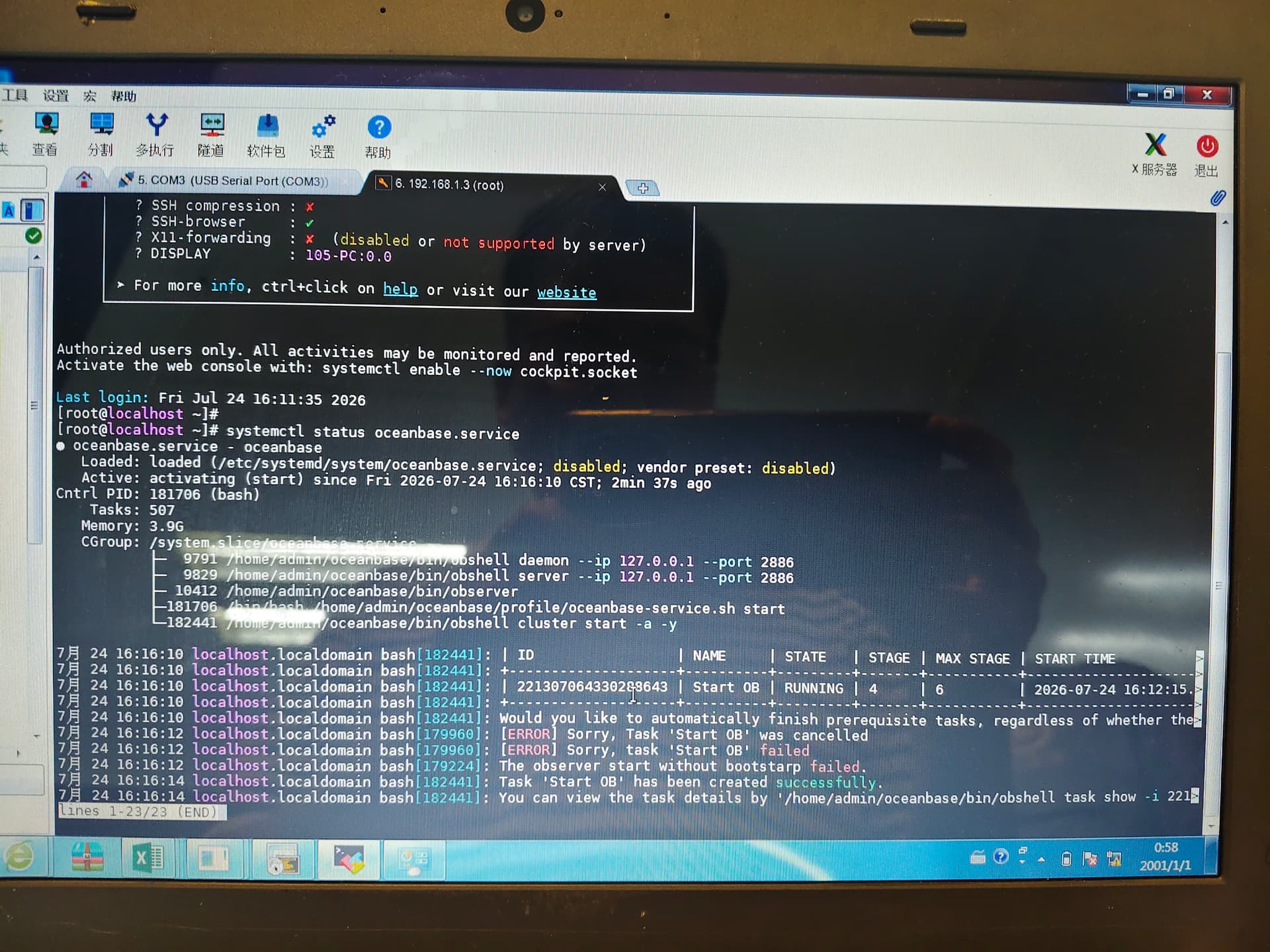
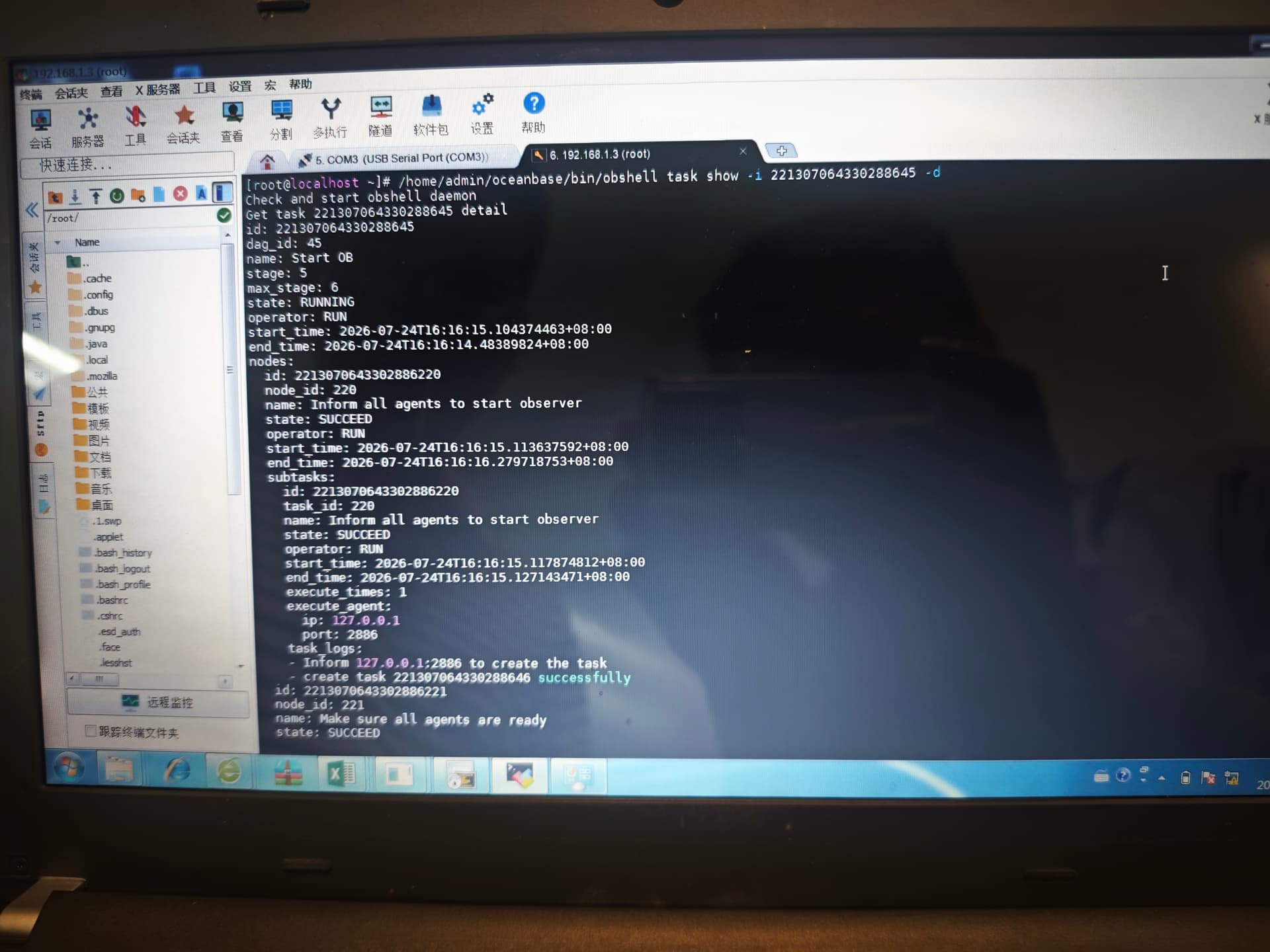
【问题描述】启动服务失败,重启机器也不行

6 个赞
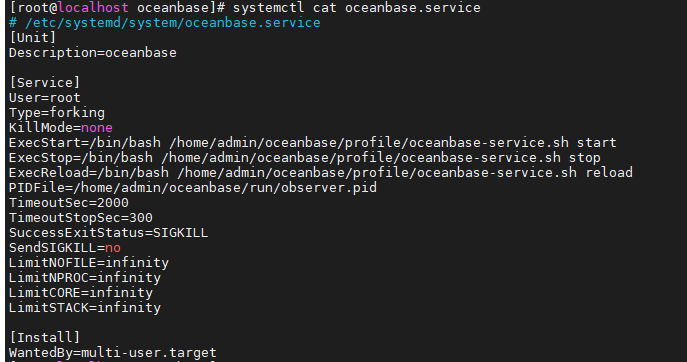
你的oceanbase服务是怎么写的呢
1 个赞
安装成功后第一次启动成功过吗?
oceanbase.service配置的发一下么?还有启动报错的信息 也发一下 启动时候的observer.log发一下 其他的启动方式 报错么?
按照步骤 发一下查的信息
– 1. 看失败任务完整日志(用图1提示的 task id)
obshell task show -i 2213070643302886645 -o
– 2. observer 进程与端口
ps -ef | grep observer
ss -lntp | grep -E ‘2881|2882|2886’
– 3. 资源
free -h
df -h /var/lib/oceanbase
– 4. observer 日志(最关键)
ls -lt /home/admin/oceanbase/log/ | head
tail -200 /home/admin/oceanbase/log/observer.log
– 或
tail -200 /var/lib/oceanbase/log/observer.log
现在只有oceanbase.service可以发了,重装了
observer日志实在是太多了,不停刷屏
目前可以了么?启动还有问题么?
我也遇到类似的
重装了就可以了
第一次成功过,重启服务业成功过
因为没有保留日志信息 不确定是哪里的问题 如果再能复现 保留日志 可以看看问题
之前出问题时重装前备份了/home/admin/oceanbase 和/var/lib/oceanbase,拿出来放到替换到新装的oceanbase了,问题可以复现了,日志也有,systemctl start oceanbase执行要20分钟才会提示失败,报错如下
[root@localhost admin]# /home/admin/oceanbase/bin/obshell task show -i 221307064330288661 -d
Check and start obshell daemon
Get task 221307064330288661 detail
id: 221307064330288661
dag_id: 61
name: Start OB
stage: 5
max_stage: 6
state: FAILED
operator: RUN
start_time: 2026-09-07T16:18:38.055888216+08:00
end_time: 2026-09-07T16:39:05.27717848+08:00
nodes:
id: 2213070643302886305
node_id: 305
name: Inform all agents to start observer
state: SUCCEED
operator: RUN
start_time: 2026-09-07T16:18:38.057611712+08:00
end_time: 2026-09-07T16:18:39.077802576+08:00
subtasks:
id: 2213070643302886305
task_id: 305
name: Inform all agents to start observer
state: SUCCEED
operator: RUN
start_time: 2026-09-07T16:18:38.077380527+08:00
end_time: 2026-09-07T16:18:38.083081601+08:00
execute_times: 1
execute_agent:
ip: 127.0.0.1
port: 2886
task_logs:
- Inform 127.0.0.1:2886 to create the task
- create task 221307064330288662 successfully
id: 2213070643302886306
node_id: 306
name: Make sure all agents are ready
state: SUCCEED
operator: RUN
start_time: 2026-09-07T16:18:40.083755094+08:00
end_time: 2026-09-07T16:18:41.090600081+08:00
subtasks:
id: 2213070643302886306
task_id: 306
name: Make sure all agents are ready
state: SUCCEED
operator: RUN
start_time: 2026-09-07T16:18:40.088549304+08:00
end_time: 2026-09-07T16:18:40.094549363+08:00
execute_times: 1
execute_agent:
ip: 127.0.0.1
port: 2886
task_logs:
- All agents have created the tasks successfully
- Check if all agents can be advanced
- 127.0.0.1:2886 is ready
id: 2213070643302886307
node_id: 307
name: Advance agents to execute the task
state: SUCCEED
operator: RUN
start_time: 2026-09-07T16:18:42.094798852+08:00
end_time: 2026-09-07T16:18:43.098703416+08:00
subtasks:
id: 2213070643302886307
task_id: 307
name: Advance agents to execute the task
state: SUCCEED
operator: RUN
start_time: 2026-09-07T16:18:42.096729343+08:00
end_time: 2026-09-07T16:18:42.10069315+08:00
execute_times: 1
execute_agent:
ip: 127.0.0.1
port: 2886
task_logs:
- advance 127.0.0.1:2886 to execute the task
id: 2213070643302886308
node_id: 308
name: Wait for all agents to execute tasks successfully
state: SUCCEED
operator: RUN
start_time: 2026-09-07T16:18:44.10680917+08:00
end_time: 2026-09-07T16:29:03.483711797+08:00
subtasks:
id: 2213070643302886308
task_id: 308
name: Wait for all agents to execute tasks successfully
state: SUCCEED
operator: RUN
start_time: 2026-09-07T16:18:44.115557466+08:00
end_time: 2026-09-07T16:29:02.56317219+08:00
execute_times: 1
execute_agent:
ip: 127.0.0.1
port: 2886
task_logs:
- Wait for task to succeed
- ‘Start preparations: wait for notification to start task’
- ‘Start preparations: wait operator to advance’
- ‘Start preparations: start to execute the task’
- ‘Check ob process and config: check if first start’
- ‘Check ob process and config: check observer process config’
- ‘Start observer: start observer’
- ‘Start observer: check if first start’
- ‘Start observer: not first start, skip require check’
- ‘Start observer: generate start cmd’
- ‘Start observer: start cmd: export LD_LIBRARY_PATH=’’/home/admin/oceanbase/lib’’;
/home/admin/oceanbase/bin/observer ’
- ‘Start observer: update self OB port’
- ‘Start observer: update OB port in all_agent’
- ‘Execute start observer sql: exec start server sql’
- ‘Execute start observer sql: ERROR: [Agent.OceanBase.NotHold]: get db instance
timeout: Agent is not holding OceanBase’
id: 2213070643302886309
node_id: 309
name: Start Zone
state: FAILED
operator: RUN
start_time: 2026-09-07T16:29:04.486685717+08:00
end_time: 2026-09-07T16:39:05.276145831+08:00
subtasks:
id: 2213070643302886309
task_id: 309
name: Start Zone
state: FAILED
operator: RUN
start_time: 2026-09-07T16:29:04.488528739+08:00
end_time: 2026-09-07T16:39:05.18442558+08:00
execute_times: 1
execute_agent:
ip: 127.0.0.1
port: 2886
task_logs:
- start zone
- 127.0.0.1:2886 end the task
- ‘ERROR: [Agent.OceanBase.NotHold]: get db instance timeout: Agent is not holding
OceanBase’
id: 2213070643302886310
node_id: 310
name: Inform all agents to end the task
state: PENDING
operator: RUN
start_time: 2026-09-07T16:18:37.737393029+08:00
end_time: 2026-09-07T16:18:37.737393029+08:00
subtasks:
id: 2213070643302886310
task_id: 310
name: Inform all agents to end the task
state: PENDING
operator: RUN
start_time: 2026-09-07T16:18:37.737456825+08:00
end_time: 2026-09-07T16:18:37.737456825+08:00
execute_times: 0
execute_agent:
ip: 127.0.0.1
port: 2886
task_logs: []
observer.zip (86.6 KB)
重新搭建可以复现么?主要这个替换的方式 不符合ob的操作预期 正常的情况下 ob允许这样替换操作的
重新安装完一个多月了,没出现,我只能这样试试了,替换应该是一样的,就这两个目录,这个observer.log日志应该怎么查,日志量太大了
是的 如果你刚才替换的方式触发了 不能判定是ob问题 因为从理论上 ob是能这样操作的 触发问题 只能重新搭建环境 复现问题 没事后面如果新建环境再出现 也可以发帖交流
好,感谢,我想了解下,再出问题的话我该在observer.log里搜什么样的关键词呢
grep “OBSERVER_NOTICE” observer.log 启动有问题 可以搜这个关键词