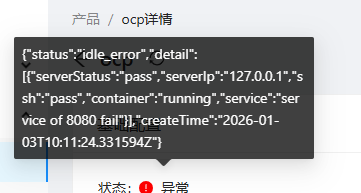
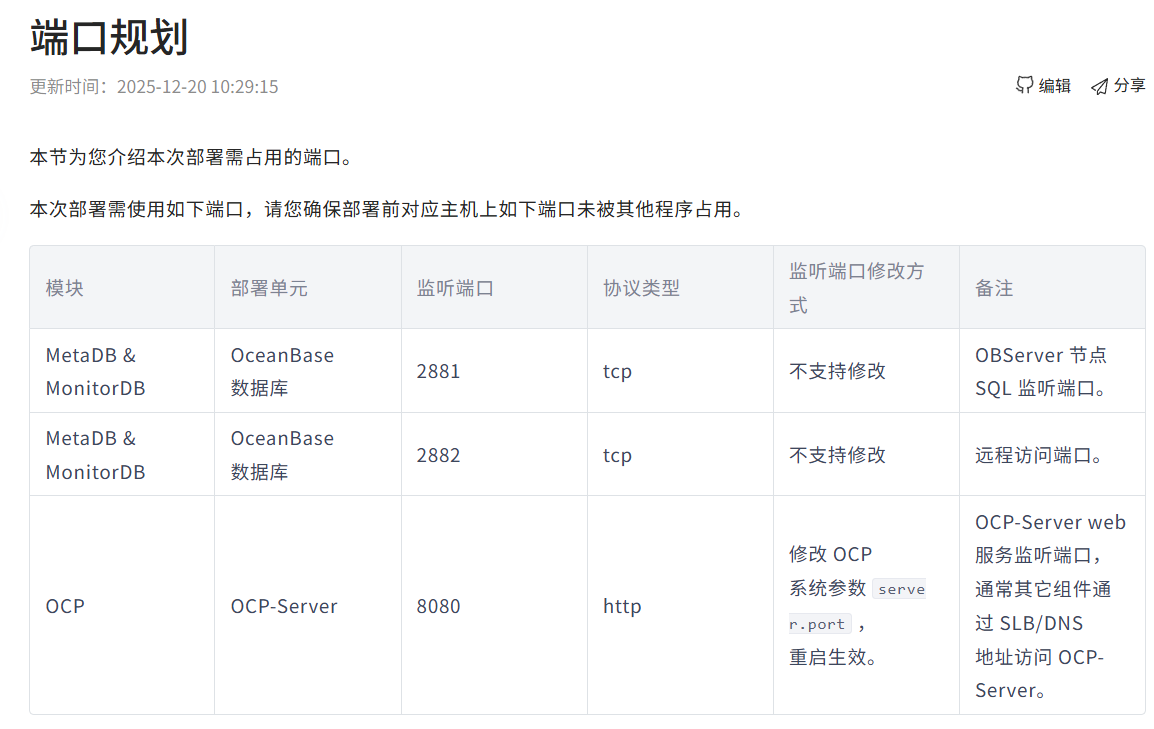
下面是完整的ocp容器日志,日志显示ic-server_00进程一直按预期重启,随后ocp-server被终止,不太清楚这是什么原因导致,系统内存是有较多剩余应该不是资源不足导致
[root@iZuf653gwrdwojfcopboyxZ ~]# docker logs ocp
2026-01-03 18:00:48,941 CRIT Supervisor is running as root. Privileges were not dropped because no user is specified in the config file. If you intend to run as root, you can set user=root in the config file to avoid this message.
2026-01-03 18:00:48,941 INFO Included extra file “/etc/supervisor/conf.d/ic.conf” during parsing
2026-01-03 18:00:48,941 INFO Included extra file “/etc/supervisor/conf.d/ocp.conf” during parsing
2026-01-03 18:00:48,943 INFO RPC interface ‘supervisor’ initialized
2026-01-03 18:00:48,943 CRIT Server ‘unix_http_server’ running without any HTTP authentication checking
2026-01-03 18:00:48,943 INFO supervisord started with pid 1
2026-01-03 18:00:49,945 INFO spawned: ‘ocp-server_00’ with pid 9
2026-01-03 18:00:49,946 INFO spawned: ‘ic-server_00’ with pid 10
2026-01-03 18:00:50,944 INFO success: ocp-server_00 entered RUNNING state, process has stayed up for > than 1 seconds (startsecs)
2026-01-03 18:00:50,954 INFO success: ic-server_00 entered RUNNING state, process has stayed up for > than 1 seconds (startsecs)
2026-01-03 18:01:49,962 INFO exited: ic-server_00 (exit status 0; expected)
2026-01-03 18:05:24,212 WARN received SIGTERM indicating exit request
2026-01-03 18:05:24,212 INFO waiting for ocp-server_00 to die
2026-01-03 18:05:25,245 WARN stopped: ocp-server_00 (exit status 130)
2026-01-03 18:05:25,654 CRIT Supervisor is running as root. Privileges were not dropped because no user is specified in the config file. If you intend to run as root, you can set user=root in the config file to avoid this message.
2026-01-03 18:05:25,654 INFO Included extra file “/etc/supervisor/conf.d/ic.conf” during parsing
2026-01-03 18:05:25,654 INFO Included extra file “/etc/supervisor/conf.d/ocp.conf” during parsing
2026-01-03 18:05:25,656 INFO RPC interface ‘supervisor’ initialized
2026-01-03 18:05:25,656 CRIT Server ‘unix_http_server’ running without any HTTP authentication checking
2026-01-03 18:05:25,656 INFO supervisord started with pid 1
2026-01-03 18:05:26,658 INFO spawned: ‘ocp-server_00’ with pid 8
2026-01-03 18:05:26,659 INFO spawned: ‘ic-server_00’ with pid 9
2026-01-03 18:05:27,700 INFO success: ocp-server_00 entered RUNNING state, process has stayed up for > than 1 seconds (startsecs)
2026-01-03 18:05:27,700 INFO success: ic-server_00 entered RUNNING state, process has stayed up for > than 1 seconds (startsecs)
2026-01-03 18:06:26,676 INFO exited: ic-server_00 (exit status 0; expected)
2026-01-03 18:10:40,515 WARN received SIGTERM indicating exit request
2026-01-03 18:10:40,515 INFO waiting for ocp-server_00 to die
2026-01-03 18:10:41,897 WARN stopped: ocp-server_00 (exit status 130)
2026-01-03 18:10:52,408 CRIT Supervisor is running as root. Privileges were not dropped because no user is specified in the config file. If you intend to run as root, you can set user=root in the config file to avoid this message.
2026-01-03 18:10:52,408 INFO Included extra file “/etc/supervisor/conf.d/ic.conf” during parsing
2026-01-03 18:10:52,408 INFO Included extra file “/etc/supervisor/conf.d/ocp.conf” during parsing
2026-01-03 18:10:52,410 INFO RPC interface ‘supervisor’ initialized
2026-01-03 18:10:52,410 CRIT Server ‘unix_http_server’ running without any HTTP authentication checking
2026-01-03 18:10:52,410 INFO supervisord started with pid 1
2026-01-03 18:10:53,412 INFO spawned: ‘ocp-server_00’ with pid 8
2026-01-03 18:10:53,413 INFO spawned: ‘ic-server_00’ with pid 9
2026-01-03 18:10:54,419 INFO success: ocp-server_00 entered RUNNING state, process has stayed up for > than 1 seconds (startsecs)
2026-01-03 18:10:54,419 INFO success: ic-server_00 entered RUNNING state, process has stayed up for > than 1 seconds (startsecs)