

【 使用环境 】测试环境
【 OB or 其他组件 】OB,ODP
【 使用版本 】observer (OceanBase_CE 4.3.5.1)
【问题描述】清晰明确描述问题
【复现路径】使用obd图形化部署后,使用"obclient -h192.168.1.117 -P2881 -uroot -p’t6WJPi0-GBfahXGd+LIZ_uiNXwQj55G’ -Doceanbase -A"可以登录,但是使用obclient -h192.168.1.117 -P2883 -uroot@sys#myoceanbase -p就报错ERROR 4669 (HY000): cluster not exist(集群名字使用的是默认myoceanbase)

1.试验一下不带集群名看看 -uroot@sys
2.麻烦发一份yaml文件 ~/.obd/cluster/xxx/根据yaml文件中的proxysys租户密码登录一下 -P2883 -uroot@proxysys试试
您好,
1:[admin@obd cluster]$ obclient -h192.168.1.117 -P2883 -uroot@sys -p
Enter password:
ERROR 4669 (HY000): cluster not exist 不带集群名字还是不能登录。使用安装部署后提示的这两条
obclient -h192.168.1.117 -P2881 -uroot -p’t6WJPi0-GBfahXGd+LIZ_uiNXwQj55G’ -Doceanbase -A
obclient -h192.168.1.117 -P2883 -uroot@proxysys -p’7|QZ6CO^(&22dT]+.C24’ -Doceanbase -A \n
都能登录
2:/home/admin/.obd/cluster/myoceanbase下的config.yaml中没看到明显proxysys
user:
username: admin
password: admin
port: 22
oceanbase-ce:
version: 4.3.5.1
release: 101000042025031818.el7
package_hash: 8826bc816ae660198f9ca5fd7e96d93c1ce4fc84
192.168.1.117:
zone: zone1
192.168.1.118:
zone: zone2
192.168.1.119:
zone: zone3
servers:
- 192.168.1.117
- 192.168.1.118
- 192.168.1.119
global:
appname: myoceanbase
root_password: t6WJPi0-GBfahXGd+LIZ_uiNXwQj55G
mysql_port: 2881
rpc_port: 2882
data_dir: /data/myoceanbase
redo_dir: /redo/myoceanbase
home_path: /home/admin/myoceanbase/oceanbase
scenario: htap
cluster_id: 1744611425
ocp_agent_monitor_password: pG6F4x2Mbh
proxyro_password: iE6Dqp7scn
enable_syslog_wf: false
max_syslog_file_count: 4
production_mode: false
memory_limit: 6G
datafile_size: 18G
system_memory: 1G
log_disk_size: 16G
cpu_count: 16
datafile_maxsize: 91G
datafile_next: 9G
depends: - ob-configserver
obproxy-ce:
version: 4.3.3.0
package_hash: 19a002976e4de93a407afe6ab4323310edb936cf
release: 5.el7
servers: - 192.168.1.117
- 192.168.1.118
- 192.168.1.119
global:
prometheus_listen_port: 2884
listen_port: 2883
rpc_listen_port: 2885
home_path: /home/admin/myoceanbase/obproxy
obproxy_sys_password: 7|QZ6CO^(&22dT]+.C24
skip_proxy_sys_private_check: true
enable_strict_kernel_release: false
enable_cluster_checkout: false
rs_list: 192.168.1.117:2881;192.168.1.118:2881;192.168.1.119:2881
observer_sys_password: iE6Dqp7scn
cluster_name: myoceanbase
observer_root_password: t6WJPi0-GBfahXGd+LIZ_uiNXwQj55G
192.168.1.117:
proxy_id: 3326
client_session_id_version: 2
192.168.1.118:
proxy_id: 3327
client_session_id_version: 2
192.168.1.119:
proxy_id: 3328
client_session_id_version: 2
depends: - oceanbase-ce
- ob-configserver
obagent:
version: 4.2.2
package_hash: 19739a07a12eab736aff86ecf357b1ae660b554e
release: 100000042024011120.el7
servers: - 192.168.1.117
- 192.168.1.118
- 192.168.1.119
global:
monagent_http_port: 8088
mgragent_http_port: 8089
home_path: /home/admin/myoceanbase/obagent
http_basic_auth_password: 4TwWHq69a
ob_monitor_status: active
depends: - oceanbase-ce
ob-configserver:
version: 1.0.0
release: 2.el7
servers: - 192.168.1.117
- 192.168.1.118
- 192.168.1.119
global:
listen_port: 8080
home_path: /home/admin/myoceanbase/obconfigserver
vip_address: 192.168.1.121
vip_port: ‘8085’
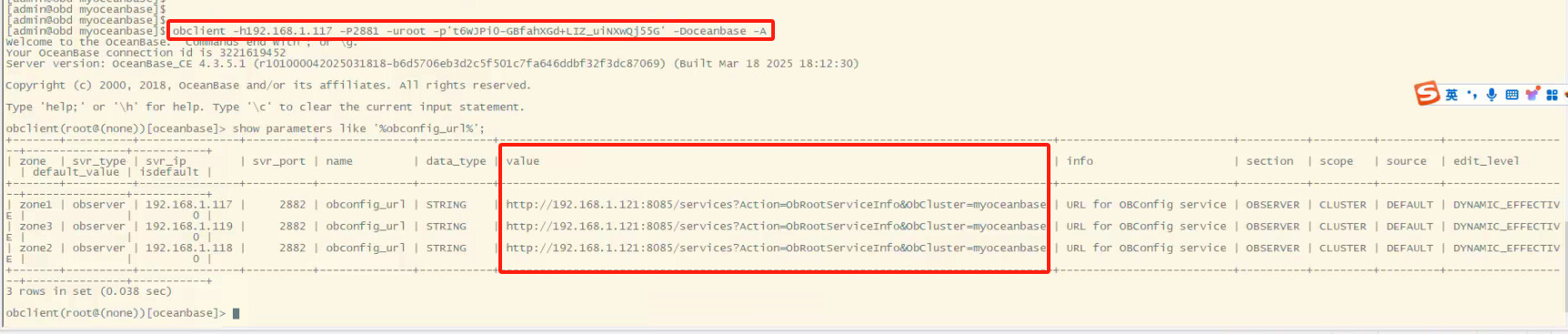
sys 租户登录到集群查看 使用2881端口
show parameters like ‘%obconfig_url%’;
查看 value 值 如果和部署配文件中的 CONFIG_URL 值不一样或者是空。
1 个赞
[admin@obd myoceanbase]$ obclient -h192.168.1.117 -P2881 -uroot -p’t6WJPi0-GBfahXGd+LIZ_uiNXwQj55G’ -Doceanbase -A
Welcome to the OceanBase. Commands end with ; or \g.
Your OceanBase connection id is 3221619452
Server version: OceanBase_CE 4.3.5.1 (r101000042025031818-b6d5706eb3d2c5f501c7fa646ddbf32f3dc87069) (Built Mar 18 2025 18:12:30)
Copyright (c) 2000, 2018, OceanBase and/or its affiliates. All rights reserved.
Type ‘help;’ or ‘\h’ for help. Type ‘\c’ to clear the current input statement.
obclient(root@(none))[oceanbase]> show parameters like ‘%obconfig_url%’;
±------±---------±--------------±---------±-------------±----------±----------------------------------------------------------------------------------±-------------------------±---------±--------±--------±------------------±--------------±----------+
| zone | svr_type | svr_ip | svr_port | name | data_type | value | info | section | scope | source | edit_level | default_value | isdefault |
±------±---------±--------------±---------±-------------±----------±----------------------------------------------------------------------------------±-------------------------±---------±--------±--------±------------------±--------------±----------+
| zone1 | observer | 192.168.1.117 | 2882 | obconfig_url | STRING | http://192.168.1.121:8085/services?Action=ObRootServiceInfo&ObCluster=myoceanbase | URL for OBConfig service | OBSERVER | CLUSTER | DEFAULT | DYNAMIC_EFFECTIVE | | 0 |
| zone3 | observer | 192.168.1.119 | 2882 | obconfig_url | STRING | http://192.168.1.121:8085/services?Action=ObRootServiceInfo&ObCluster=myoceanbase | URL for OBConfig service | OBSERVER | CLUSTER | DEFAULT | DYNAMIC_EFFECTIVE | | 0 |
| zone2 | observer | 192.168.1.118 | 2882 | obconfig_url | STRING | http://192.168.1.121:8085/services?Action=ObRootServiceInfo&ObCluster=myoceanbase | URL for OBConfig service | OBSERVER | CLUSTER | DEFAULT | DYNAMIC_EFFECTIVE | | 0 |
±------±---------±--------------±---------±-------------±----------±----------------------------------------------------------------------------------±-------------------------±---------±--------±--------±------------------±--------------±----------+
3 rows in set (0.038 sec)
1 个赞
obclient -h192.168.1.117 -P2883 -uroot@proxysys -p’7|QZ6CO^(&22dT]+.C24’ -Doceanbase -A
执行show proxyconfig看一下rootservice_list参数是啥
1 个赞
这个参数 也查一下
obclient -h192.168.1.117 -P2883 -uroot@proxysys -p’7|QZ6CO^(&22dT]+.C24’ -Doceanbase -A
show proxyconfig like ‘enable_cluster_checkout’;
curl -s ‘http://192.168.1.121:8080/services?Action=GetObProxyConfig’ | jq .
1 个赞
您好如下
obclient(root@proxysys@proxysys)[oceanbase]> show proxyconfig like ‘rootservice_list’;
±-----------------±---------------------------------------------------------±-----------------------------------------------------------------------------------------------------------------±------------±--------------±------±-------------+
| name | value | info | need_reboot | visible_level | range | config_level |
±-----------------±---------------------------------------------------------±-----------------------------------------------------------------------------------------------------------------±------------±--------------±------±-------------+
| rootservice_list | 192.168.1.117:2881;192.168.1.118:2881;192.168.1.119:2881 | a list of servers against which election candidate is checked for validation, format ip1:sql_port1;ip2:sql_port2 | true | SYS | | LEVEL_GLOBAL |
±-----------------±---------------------------------------------------------±-----------------------------------------------------------------------------------------------------------------±------------±--------------±------±-------------+
您好如下
obclient(root@proxysys@proxysys)[oceanbase]> show proxyconfig like ‘enable_cluster_checkout’;
±------------------------±------±---------------------------------------------------------------------------------------------±------------±--------------±------±-------------+
| name | value | info | need_reboot | visible_level | range | config_level |
±------------------------±------±---------------------------------------------------------------------------------------------±------------±--------------±------±-------------+
| enable_cluster_checkout | False | if enable cluster checkout, proxy will send cluster name when login and server will check it | false | USER | | LEVEL_GLOBAL |
±------------------------±------±---------------------------------------------------------------------------------------------±------------±--------------±------±-------------+
1 row in set (0.002 sec)
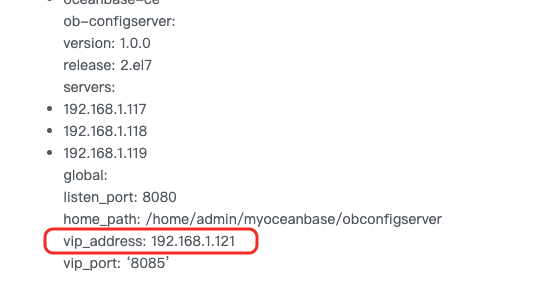
你的121是否部署了负载均衡服务。 vip绑定到obproxy的3个IP 没。

这个没做绑定,要绑定吗?我图形化界面没看到要绑定,说是要填写这个vip
请问这个jq是什么
需要,这边刚才测试部署了单节点的ob—+odp+configserver是没问题的。
可能就是你vip负载均衡那里导致的
jq 是一款命令行的 json 处理工具 你先按照我发的查一下
1 个赞
请问这个绑定有官方文档参考链接吗?我看看
我安装下这个jq工具
绑vip应该是主机层面的操作了。如果不需要configserver,建议重新部署一个ob+obproxy的即可
是把这个vip绑定到公网网卡上吗?
您好,jq这个我在yum里面没发现有,能分享下吗?